Pages

Wednesday, May 29, 2013

Fiery Tom Yum at BBQ Thai

If you fancy being whisked away to the land of smiles for a night but can't afford the flight ticket, BBQ Thai might just be your answer. The restaurant has been opened since the beginning of the year and attracts plenty of customers nightly, packing full house crowds on weekends.

Dining is al fresco style at BBQ Thai, and the moment you step into the compound you are greeted by the sight of small private dining rooms in quaint little colourful huts, accesorised with quirky chic deco and the odd tuk tuk.
The restaurant offers both Thai BBQ meat platters as well as more staple Thai street fare, such as fried rice and noodles, as well as tom yum and the green / red curries.

Serving sizes are huge, so it is advisable to go in a group of friends so you can try a larger variety of dishes. Between two of us, we shared a small pot of tom yum (RM15 - chicken; RM20 - seafood), which turned out to be huge, easily serving 3-4 people, a plate of Thai-style fried kuey teow (RM14), and a dish of stir-fried paku-pakis (RM13). All in, plus drinks, the bill came to about RM47 for two, reasonable considering there were leftovers to tapau home!
Warning: Their spicy tom yum soup, while being strong-bodied, potent, and flavourful, is not for the faint-of-heart. It packs a whopping punch, leaving your stomach on fire long after you've finished your meal!
When it's not too packed, service is top-notch, with our food arriving in less than 10 minutes. On another occasion when the place was busier, however, staff were unhelpful and service was slow, so try to visit this place on weekdays instead of weekends.

The place is pretty simple to find. From the Mid Valley circle, turn out to Old Klang Road and immediately keep to the left. On the left side of the main road, you'll be able to spot a bright neon pink sign with the restaurant name on it. There's ample parking in the vicinity for customers only.

BBQ Thai 
17 Lorong Jugra
Off Batu 3 1/3, Jalan Klang Lama
58000 Kuala Lumpur
Tel:  03-79819888

Monday, May 27, 2013

Introducing the Samsung 4G Chromebook: A new way to look at personal computing

I am an unabashed early adopter with an ardent enthusiasm for all things new. Whenever Facebook or Google+ gets an interface makeover, or when Gmail sneakily slips in new features and buttons without warning, instead of moaning about how I'll have to get adjusted to the new layout all over again, it gives me a renewed sense of purpose to continue visiting the site, to see what else it can now do.


So when I was given one of the earlier versions of the Samsung 4G Chromebook for work use at the start of this year, way before it was launched to the public last weekend, I was thrilled. And after personally using the Chromebook for a few months now, I can honestly say that the Chromebook is my new favourite device, among my smartphone, iPad, laptop, and desktop.

In fact, I've barely touched my tablet and laptop since the Chromebook came around. My phone has been relegated primarily for calling and messaging purposes, and I only fire up my desktop PC because I need to use Adobe Creative Suite software. For everything else, there's the Chromebook.

After demoing and selling the Chromebooks at our launch roadshow over the weekend, the most frequent questions I've encountered are the following, and the answers I give are below:

1. How will I use my Microsoft office software on the Chromebook? Is it compatible if I need to send files to other people who use Microsoft?
With Google Drive, you have web equivalents of your common Microsoft software, such as Docs instead of Microsoft Word, Presentations instead of PowerPoint, and Spreadsheets instead of Excel. For most of the functions of these programs, Google Drive is a formidable alternative. The benefits of using Google Drive is that you don't have to a) pay for software licensing, and b) constantly update your Microsoft Office suite every year. The Chromebook automatically updates itself every 6 weeks, so it always stays new, without the need to download / buy / run / install anything at all. And files created on Google Drive can be exported into all the commonly used file formats, no there is no compromise on compatibility with other operating systems.

2. Is it really that easy to use?
Yup. If you know how to surf the web, you know how to use a Chromebook. There is no OS on the Chromebook - it runs purely on the web. It doesn't lag or slow down over time, and it takes just 8 seconds to start up from the time you press the "On" button.

3. What is the processor / hardware that the Chromebook uses?
It uses the Samsung Exynos 5 processor. While I am no techie person, I asked one of the product guys to explain the benefits of the processor to me, and what he explained was that basically, the processor belongs to the same family of processors used in mobile devices such as the Samsung SIII and the Galaxy Note (both use the Exynos 4 processor). What that means is that it is designed for lightweight mobile devices and therefore, it is very energy-efficient and doesn't heat up the computer. I can personally attest to the fact that even after hours of continuous use, being laid completely flat on a table or on your lap, the Chromebook doesn't get hot at all. It also uses a 16GB solid-state drive, so that browsing speeds are at an optimal level.

4. So I need to be connected to the Internet all the time to use the Chromebook? That's quite inconvenient / expensive.
In today's world, most of what you do on a computer requires an Internet connection anyway. If you live in urban / suburban areas, your office and home will likely have wireless connectivity that is already paid for. The Chromebook is WiFi-enabled so you can switch to that setting when you're in areas with wireless Internet. The Chromebook also comes with a built-in 4G chip that connects you to the Yes 4G network, so even if you are on the go, you don't need any third-party external device (eg. a USB Dongle / a mobile hotspot) to get connected to the web.

5. Basically it can do whatever a tablet can do, so why should I get a Chromebook?
At just 1.08kg, the Chromebook is only slightly heavier than a tablet, so it gives you the mobility of a tablet (I actually stick my Chromebook into my handbag almost daily) - but with the richer experience of a laptop. Without a keyboard, and with a smaller screen, the browsing experience is significantly slowed down and diluted on a tablet. So yes, you can do essentially the same things on a tablet - but why would you, when you can have the full laptop experience at a fraction of the weight (and price)?


Some other things that I think are pretty sweet about making the switch over to the Chrome OS:
  • The Chrome Web Store boasts plenty of free and beautifully designed apps, most of which are compatible across PC / Android / Mac - no more paying for apps that you can only use on a selective system (*cough* like Apple *cough*). 
  • The Chromebook comes with 100GB of cloud storage space on Drive that can be assigned to any Gmail address (you can reuse your existing ID if you don't want to switch over to a new one). 
  • No more worrying about viruses or trojans because there is no OS to attack.
  • If your device gets damaged / stolen / lost, not only are your files safely stored in the cloud, but you can also prevent anyone else from gaining access to your files, because everything is tied to your personal ID and password, plus, if you've forgotten to log out, you can always log in on any other devices and force log your ID out of any other locations it is signed in to. Your information has never been this safe before! (Disclaimer: As long as you don't forget your password! But with increasing integration between different cloud-based services, how hard is it to remember just one ID and password?)
  • Google Drive has no "Save" button, because everything saves automatically, and you can revert to older revisions of any document based on the timestamp. So if you accidentally delete your work or do something silly, you can rest assured that your work will not be gone just like that.
To sum it up, as a TIME tech author eloquently put it, "the point of Chromebooks isn't Chromebooks". The point of Chromebooks is not about the device at all. The point is to make devices irrelevant. The release of the new 4G Chromebook heralds a new era in technology - one that is built not on latest versions of programs and hardware, but on a web- and cloud-centric view of personal computing.

To understand more about how the Chromebook works, watch this video:


Or, visit this website.

Feedly: An clean, simple alternative to Google Reader

Earlier this year, Google announced that they would be retiring Google Reader from service this July. Like many other avid readers, my first reaction was one of horror - where else would I access all my feeds in an aggregator as efficient and minimalist as Google Reader?

One of the popular aggregators at the moment is Flipboard, which is beautiful, yes, but it's designed primarily for mobile device use, and casual browsing, not to consolidate, tag, and archive a huge amount of feeds like Google Reader. It's visually-driven, which means slower loading times and a reading experience that doesn't quite cut it (you have to click out of the reader to read a long text post). I mostly use Google Reader for well, reading my news articles and blogs filled with lengthy reflections on life, so Flipboard just doesn't do it for me.

Feedly - where the minimalistic, sleek look of Flipboard meets the efficiency of Google Reader
And then I discovered Feedly while searching for alternatives on the Chrome Web Store. A straight-forward, no-fuss, simple feed reader that does for me what Google Reader does. It automatically migrates all my 100+ feed subscriptions to its reader, sorts out what I've read and what's new quite similarly to how Google Reader does, it allows you to tag / save for later individual posts, and has seamless sharing buttons for all the major social networking sites.

I am one happy camper now that I know my feeds have made the migration over to an equally capable aggregator. Also, I am so impressed that after automatically migrating all my feeds from Reader, Feedly intelligently sorted them based on their content into broad categories, placing my John Maxwell feeds under "Leadership and Development", for example, and all my food blogs under "Food & Living". Impressive.

Have I mentioned how clean and beautiful the Feedly interface is too?

Saturday, April 6, 2013

What I want for every single kid


I've been volunteering to teach English and Math tuition to a group of underprivileged Standard 3 kids who live at a low-cost housing area in Subang as part of my church's community outreach efforts since January. For the last three months, progress has been slow and frustrating, with many of them unable to confidently grasp the topics that they should have mastered at their level. 

I found myself wondering if I was really making a difference, if there was something wrong with the approach we were using of trying to drill the concepts into their head - surely, if they were not grasping the concepts in school, how could I, with no background in their teaching, help them do any better? And two hours once a week is so little time, and they have so far to go - how could it make a difference? 

Nonetheless, inspired by the recent TEDxKLChange during which a video talk by Sugatha Mitra was screened, I decided to take a cue from his hole-in-the-wall experiment. 

Because of what he had experienced first-hand with hardcore poor children in the slums all over India, he came to the conclusion that every single kid, no matter what their background, has the innate ability to learn and discover, and it simply needs to be encouraged and drawn out.

He says, "If you allow the educational process to self-organize, then learning emerges. It's not about making learning happen. It's about letting it happen. The teacher sets the process in motion and then she stands back in awe and watches as learning happens."

"There was a time when Stone Age men and women used to sit and look up at the sky and say, "What are those twinkling lights?" They built the first curriculum, but we've lost sight of those wondrous questions. We've brought it down to the tangent of an angle. But that's not sexy enough. The way you would put it to a nine-year-old is to say, "If a meteorite was coming to hit the Earth, how would you figure out if it was going to or not?" And if he says, "Well, what? How?" you say, "There's a magic word. It's called the tangent of an angle," and leave him alone. He'll figure it out."

Inspired, I decided to put some time aside to plan and prepare for several new approaches to the session with the kids today that focused on giving them ownership of their learning, and motivating them by encouraging and rewarding personal progress. The session went better than I expected, and I experienced many small wins in the two hours I spend with them. 

Here's a summary of the new initiatives I tried out and how they went:


Class Dojo

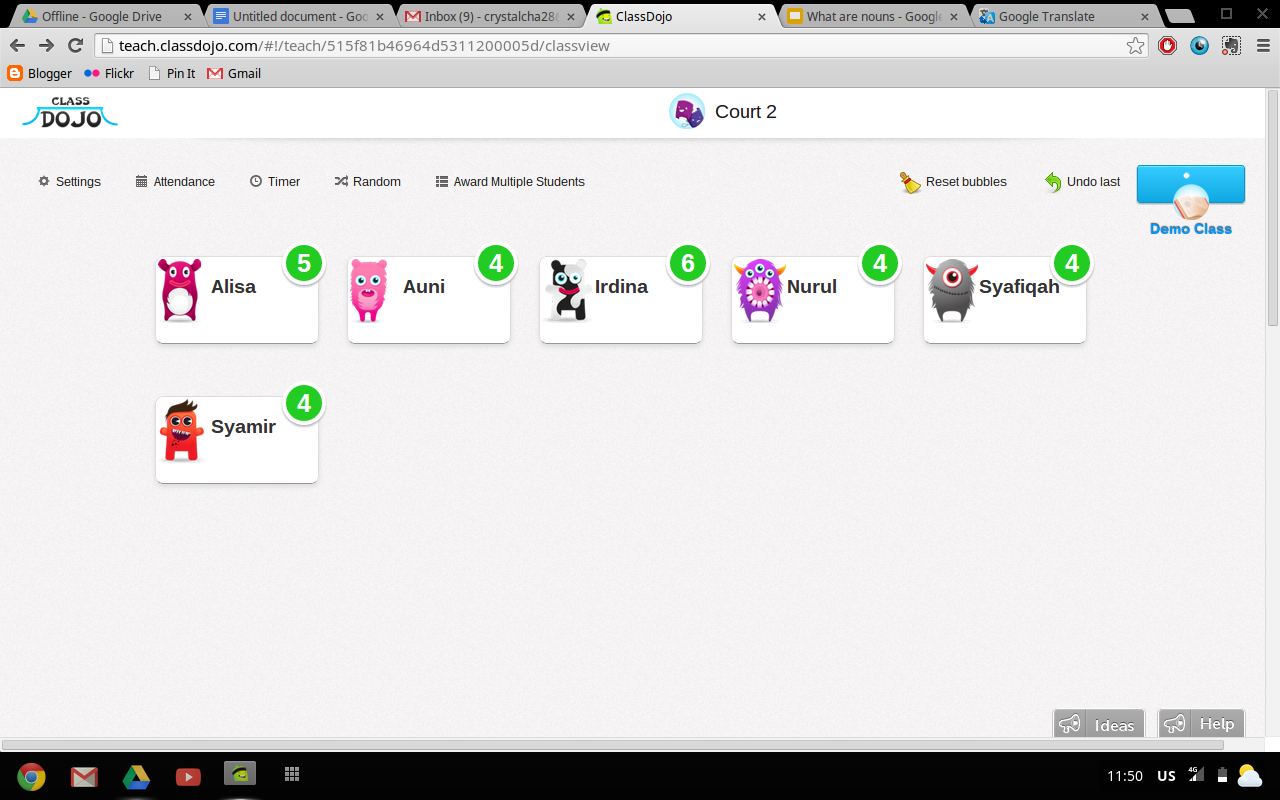
Class Dojo was a behavior management app I stumbled across while doing some research for my company. As the kids walked into the community center, I got them to ‘register’ by typing their names in and to pick a colourful avatar to represent themselves as soon as they came into class. I explained to them that this was a system to reward good behaviour and progress in their work, for example if they helped a friend with their work, or if they did really well or finished their work quickly. I told them that at the end of the class, the two kids with the highest marks would be able to pick a mystery prize from a box of goodies I brought. 

Even though I only had a small laptop screen, the kids’ eyes lit up to see their names and their chosen avatar on the screen - it gave them a sense of ownership and community. The kids were very enthusiastic about keeping track of the points, pointing out who was helping who, and who had finished their work. This really helped keep the class of six in order without very much effort.

Previously, they used to be very shy and hesitant to interact with each other as they were still not familiar with each other, and tended to do their own work in isolation, only interacting with the rest when they got bored and started bickering or being cheeky or kicking each other under the tables. 

Having a mini PowerPoint lesson

Normally, because of a lack of preparation, I used to dive right into the workbooks and use verbal explanations along the way when they didn't understand something, which was really frustrating as their command of English is terrible and my command of BM is equally terrible, so often, verbal explanations get lost in translation.

Today, I started off with a PowerPoint presentation that I took some time during the week to prepare. The kids were very excited the moment I told them we were going to learn something from the computer. Normally, it's hard keeping their attention for even 15 consecutive minutes without one or another starting to misbehave. Throughout my short lesson, their attention was fixed on the screen and they started getting excited when I showed them pictures and examples of the different types of nouns that there were. I realised that having that short presentation (even though they had to crowd around the computer to see it) helped the kids warm-up and get into the topic of focus for the day. 

Showing them a lot of visuals and to explain the different types of nouns really captured their attention and got them thinking about and picturing in their heads more types of nouns in the exercises that they did later. The session was wrapped up with another recap of the lesson to reinforce what they had learned, and all the kids read out loud from the screen very enthusiastically. 

Worksheets

Today I decided not to use the normal fill-in-the-blank workbooks (which often come with a standard bank of jumbled up answers to pick from, which I've noticed makes the kids 'tembak' or try to guess by way of eliminating the right answers, without being really fully confident that their answers are correct). I printed out visually-attractive worksheets off the Internet instead. The kids got really excited about the new worksheets but were stumped as to what to do at first. I purposely chose worksheets with open-ended instructions such as write down as many nouns that you can see around you as possible. As first they were like, "Teacher, susah la ini" (Teacher, this is so difficult!), but I took my laptop and went back to what was presented in the slides. I reminded the kids of the different types of nouns and gave them a few suggestions to get started, and then left them to it.

They started asking questions (“Teacher, is this a noun? Is that a noun?”) and even discussing their answers among each other, which was a huge step from previous classes where the kids just expected to be spoon-fed the answers. 

Nurul

My biggest personal 'win' today was with one of the girls I particularly struggle teaching. Nurul has not been very participative, is constantly distracted, and withdraws when I ask her a question in the middle of the class. She has more trouble with English than the rest, and so when I ask her questions in front of the rest, I get the vibe that she feels put on the spot, and so she just refuses to answer. I have tried spending one-on-one time reading with her, but she can barely last for more than 2-3 pages of a Grade 2-level Peter and Jane book (usually with me having to demonstrate at least once first how to pronounce almost 80% of the words) before she gets tired and distracted.

Today, after I had dismissed the class, I was going through a Peter & Jane book with one of the other girls who stayed back to read. Nurul came alongside me, at first just out of curiosity. She started reading out loud with the other girl. The other girl then walked away about halfway through the book, so I asked Nurul to continue reading on, not expecting much. Not only did she continue reading, but she kept reading even when the sentences started getting harder. And she was actually pronouncing many of the words correctly!

She did come to a point where she used her favourite phrase, "Cikgu, penat lah" (Teacher, I'm dead tired of this), and because she had made it so surprisingly far, I said, "Okay, you can go because you've done so well. You're such a good reader!" But despite her complaining, something made her stay on for the next few pages, and before I knew it, we were at the last page of the book!


I was blown away by what just happened - it hit me that so many of these kids that are labelled 'difficult' or 'slow' actually have just as much potential within them as much as the next kid. Sometimes it just takes a bit of time to see it, the right environment to coax it out of them, a bit less pressure, a bit more motivation, and that potential reveals itself suddenly and unexpectedly. Not because you 'taught' it to them or forced it out of them - but because you actually realised it was already there and all that was needed was just some encouragement.

I want every kid to have his very own 'Aha!' moment 


When I started teaching at the Court 2 community center, I wondered if I was really cut out to be in education. Sure, I work in an edutech company so I understand a lot of the theories and principles of the field, but how much actual hands-on experience have I had? I respected and admired the Teach for Malaysia Fellows from afar, marvelling at their passion for teaching and their heart for the students they often affectionately refer to as 'my children', but I did not feel that same burning passion.

But today it hit me - I love watching kids experience that ‘aha!’ moment as they learn and discover things for themselves. I saw it today with Nurul. I saw it today as the class threw questions at me and as I explained why something was or was not a noun, they started going, “Ohhhhh...” 

I love seeing kids eyes light up when something finally 'clicks' in their head, and they finally compute why something is supposed to be a certain way. I love watching that look on their faces because it reminds me of how much I loved learning new things as I grew up.

As a homeschooler, I was not forced to learn - my curiosity to learn was cultivated and encouraged by my parents. I learned how to make potato print patterns as a toddler, how to make papier-mâché bowls at six, taught myself to bake brownies at 11, set up an online baking business from home at 17. My parents gave us the liberty of using the computer for learning at a time when that idea was still very futuristic and scary to many parents. I fell in love with Geography as I watched videos of the Grand Canyon and Niagara Falls. My education, rather than making me feel bored and stifled, ignited my imagination and made me feel like the world was the most amazing place to explore and discover.

It dawned on me today that I want that same experience for every kid. I want every kid to have his very own 'Aha!' moment - in fact, lots of those moments. I want them to not be afraid to ask questions and to know there's no such thing as a stupid question. I want them to discover what they're good at, and to realise that they can use what they're good at to help others. 

I realised that in whatever capacity, whether it be behind-the-scenes in an office designing material for a edutech company, or by hands-on volunteering at a community center, or through organising the XtraMile Run to raise funds for a school that gives underprivileged children a chance at a good education, I want to use what I have to work towards that.

Tuesday, April 2, 2013

Carrot cake with cream cheese frosting


Over the weekend, I satisfied a craving to bake by whipping up some home-baked carrot cake with cream cheese frosting! 

As I savoured the smell of carrots and cinnamon wafting from the oven in delicious anticipation, I was especially reminded this Easter that the reason we break bread and drink wine together to remember this significant weekend. It's a reminder that God came down in flesh, in 3D, to provide us with an unforgettable, multisensory experience of Himself. 


There is nothing less sacred about quiet moments in the kitchen with God than in church where a huge band is playing and a powerful speaker in preaching. God came down to earth so His love could penetrate every area of our lives - our waking, our sleeping, our eating, our working, our relationships.


Hope you had a wonderful Easter, everyone!


Simple carrot cake recipe
From Allrecipes.com
INGREDIENTS:
4 eggs
1 1/4 cups vegetable oil
2 cups white sugar
2 teaspoons vanilla extract
2 cups all-purpose flour
2 teaspoons baking soda
2 teaspoons baking powder
1/2 teaspoon salt
2 teaspoons ground cinnamon
3 cups grated carrots
1 cup chopped pecans
1/2 cup butter, softened
8 ounces cream cheese, softened
4 cups confectioners' sugar
1 teaspoon vanilla extract
1 cup chopped pecans
DIRECTIONS:
1.Preheat oven to 350 degrees F (175 degrees C). Grease and flour a 9x13 inch pan.
2.In a large bowl, beat together eggs, oil, white sugar and 2 teaspoons vanilla. Mix in flour, baking soda, baking powder, salt and cinnamon. Stir in carrots. Fold in pecans. Pour into prepared pan.
3.Bake in the preheated oven for 40 to 50 minutes, or until a toothpick inserted into the center of the cake comes out clean. Let cool in pan for 10 minutes, then turn out onto a wire rack and cool completely.
4.To Make Frosting: In a medium bowl, combine butter, cream cheese, confectioners' sugar and 1 teaspoon vanilla. Beat until the mixture is smooth and creamy. Stir in chopped pecans. Frost the cooled cake.